
AM303 Water Level Sensor
water level. Water Level Sensor.
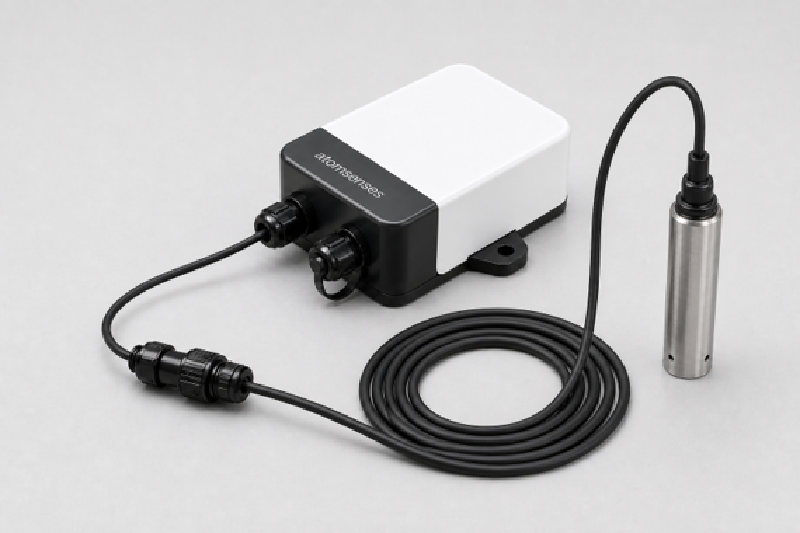
About this device
water level. Water Level Sensor.
The AM303 Water Level Sensor supports 8 regional frequency plans and operates as a Class A LoRaWAN device.
Key features
- Sensors: level.
- LoRa Alliance certified, verified interoperability with The Things Stack and other LoRaWAN network servers.
- 8 frequency plans supported: AS923, AU915-928, CN470-510, EU863-870, IN865-867, KR920-923, RU864-870, US902-928.
Vendor
Atomsenses
30 devices in the repository
At a glance
Model IDam303
LoRaWAN classA
MAC version1.0.3
Hardware specifications
| Model ID | am303 |
Sensors & capabilities
Certifications & compliance
LoRa Alliance Certified
Standards
Designed for LoRaWAN 1.0.3
with regional parameters RP001-1.0.3-RevA.
Profiles in this repository are loaded automatically by The Things Stack.
Network profiles
Capabilities are defined per firmware version and frequency plan, exactly as published in the repository.
Firmware 1.0
| Frequency plan | MAC | Reg. params | Class | Join | Max EIRP | Certified |
| AS923 | 1.0.3 | RP001-1.0.3-RevA | A | OTAA | 20 dBm | Yes |
| AU915-928 | 1.0.3 | RP001-1.0.3-RevA | A | OTAA | 20 dBm | Yes |
| CN470-510 | 1.0.3 | RP001-1.0.3-RevA | A | OTAA | 19 dBm | Yes |
| EU863-870 | 1.0.3 | RP001-1.0.3-RevA | A | OTAA | 16 dBm | Yes |
| IN865-867 | 1.0.3 | RP001-1.0.3-RevA | A | OTAA | 16 dBm | Yes |
| KR920-923 | 1.0.3 | RP001-1.0.3-RevA | A | OTAA | 20 dBm | Yes |
| RU864-870 | 1.0.3 | RP001-1.0.3-RevA | A | OTAA | 16 dBm | Yes |
| US902-928 | 1.0.3 | RP001-1.0.3-RevA | A | OTAA | 20 dBm | Yes |
Frequency plan coverage
EU863-870
US902-928
AU915-928
AS923
AS923-2
AS923-3
KR920-923
IN865-867
RU864-870
CN470-510
EU433
AS923-4
Add to The Things Stack
Manual setup
1
Create an application
In The Things Stack console, go to Applications → Create application and pick a unique application ID.
2
Register an end device
Choose From the LoRaWAN Device Repository and search for “AM303 Water Level Sensor”. Select your firmware version and frequency plan.
3
Enter device credentials
Provide the DevEUI, JoinEUI and AppKey printed on the device label or QR code.
4
Power on & verify uplinks
Within a few minutes you'll see the join request and uplinks in the Live data tab.