
RS485-LN - RS485 to LoRaWAN®
The Dragino RS485-LN is an RS485 to LoRaWAN® converter. It allows the RS485 devices to use LoRaWAN wireless protocol which simplifies the IoT installation and reduces the installation/maintaining cost.
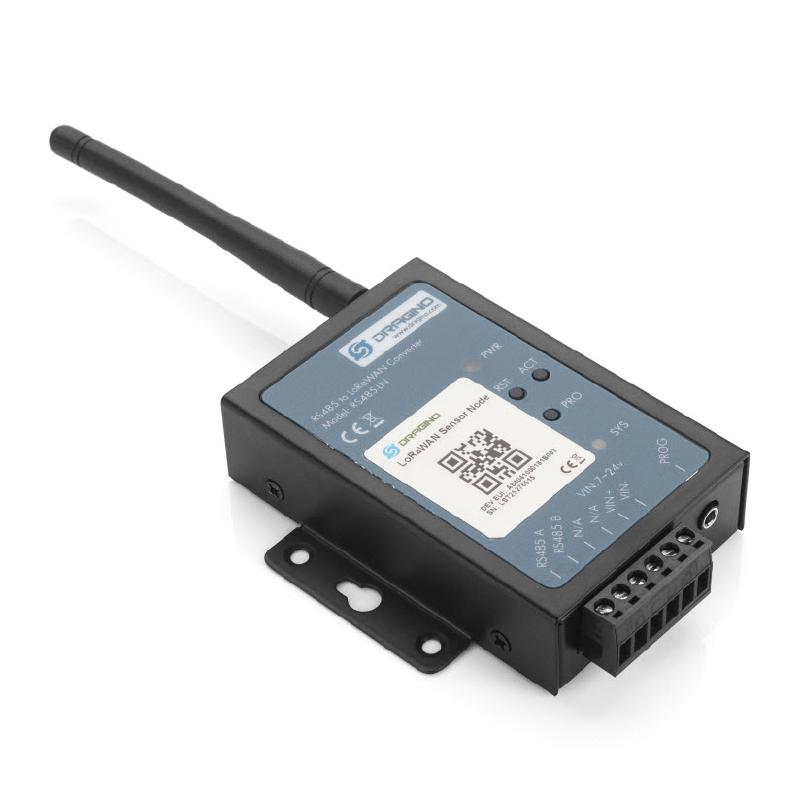
About this device
The Dragino RS485-LN is an RS485 to LoRaWAN® converter. It allows the RS485 devices to use LoRaWAN wireless protocol which simplifies the IoT installation and reduces the installation/maintaining cost.
The RS485-LN - RS485 to LoRaWAN® supports 9 regional frequency plans and operates as a Class A/C LoRaWAN device.
Key features
- 9 frequency plans supported: AS923, AU915-928, CN470-510, EU433, EU863-870, IN865-867, KR920-923, RU864-870, US902-928.
Vendor
At a glance
Hardware specifications
| Model ID | rs485-ln |
| Dimensions | 90 × 110 × 25 mm |
| Weight | 210 g |
Sensors & capabilities
No sensors listed for this device.
Certifications & compliance
Standards
Network profiles
Capabilities are defined per firmware version and frequency plan, exactly as published in the repository.
Firmware 1.3
| Frequency plan | MAC | Reg. params | Class | Join | Max EIRP | Certified |
| AS923 | 1.0.3 | RP001-1.0.3-RevA | A / C | OTAA | 20 dBm | — |
| AU915-928 | 1.0.3 | RP001-1.0.3-RevA | A / C | OTAA | 20 dBm | — |
| CN470-510 | 1.0.3 | RP001-1.0.3-RevA | A / C | OTAA | 19 dBm | — |
| EU433 | 1.0.3 | RP001-1.0.3-RevA | A / C | OTAA | 12 dBm | — |
| EU863-870 | 1.0.3 | RP001-1.0.3-RevA | A / C | OTAA | 16 dBm | — |
| IN865-867 | 1.0.3 | RP001-1.0.3-RevA | A / C | OTAA | 16 dBm | — |
| KR920-923 | 1.0.3 | RP001-1.0.3-RevA | A / C | OTAA | 20 dBm | — |
| RU864-870 | 1.0.3 | RP001-1.0.3-RevA | A / C | OTAA | 16 dBm | — |
| US902-928 | 1.0.3 | RP001-1.0.3-RevA | A / C | OTAA | 20 dBm | — |
Firmware rs485-ln abp
| Frequency plan | MAC | Reg. params | Class | Join | Max EIRP | Certified |
| AS923 | 1.0.3 | RP001-1.0.3-RevA | A / C | ABP | 16 dBm | — |
| AU915-928 | 1.0.3 | RP001-1.0.3-RevA | A / C | ABP | 30 dBm | — |
| CN470-510 | 1.0.3 | RP001-1.0.3-RevA | A / C | ABP | 19 dBm | — |
| EU433 | 1.0.3 | RP001-1.0.3-RevA | A / C | ABP | 12 dBm | — |
| EU863-870 | 1.0.3 | RP001-1.0.3-RevA | A / C | ABP | 16 dBm | — |
| IN865-867 | 1.0.3 | RP001-1.0.3-RevA | A / C | ABP | 30 dBm | — |
| KR920-923 | 1.0.3 | RP001-1.0.3-RevA | A / C | ABP | 14 dBm | — |
| RU864-870 | 1.0.3 | RP001-1.0.3-RevA | A / C | ABP | 16 dBm | — |
| US902-928 | 1.0.3 | RP001-1.0.3-RevA | A / C | ABP | 30 dBm | — |
Frequency plan coverage
Add to The Things Stack
Manual setup
Create an application
In The Things Stack console, go to Applications → Create application and pick a unique application ID.
Register an end device
Choose From the LoRaWAN Device Repository and search for “RS485-LN - RS485 to LoRaWAN®”. Select your firmware version and frequency plan.
Enter device credentials
Provide the DevEUI, JoinEUI and AppKey printed on the device label or QR code.
Power on & verify uplinks
Within a few minutes you'll see the join request and uplinks in the Live data tab.