MeterMon (MM8)
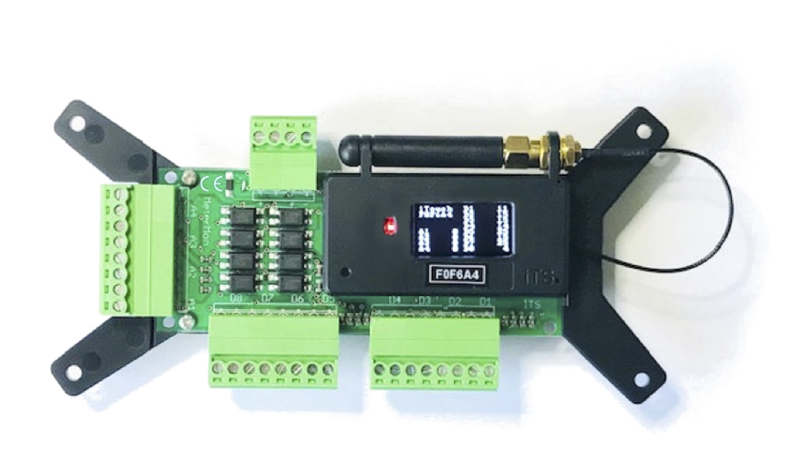
MeterMon (MM8) supports the connection of up to eight utility meters, including water, gas and electricity meters. It features a built-in LED display showing the pulse count for each of its eight inputs, allowing users to check meter readings locally. The device operates on a 9–18V DC power supply. Multiple MeterMon units can be linked using an RS485 cable, with one unit acting as the Master and relaying data from the connected Slave units. With a Modbus adaptor fitted, the same MeterMon can also communicate with and collect readings from up to 32 Modbus devices, providing greater flexibility and scalability for energy monitoring applications.
About this device
MeterMon (MM8) supports the connection of up to eight utility meters, including water, gas and electricity meters. It features a built-in LED display showing the pulse count for each of its eight inputs, allowing users to check meter readings locally. The device operates on a 9–18V DC power supply. Multiple MeterMon units can be linked using an RS485 cable, with one unit acting as the Master and relaying data from the connected Slave units. With a Modbus adaptor fitted, the same MeterMon can also communicate with and collect readings from up to 32 Modbus devices, providing greater flexibility and scalability for energy monitoring applications.
The MeterMon (MM8) supports 1 regional frequency plan and operates as a Class A LoRaWAN device. A payload codec is published in the repository, so uplinks are decoded automatically when you onboard it to The Things Stack.
Key features
- Sensors: pulse count, analog input, voltage.
- Payload codec included, uplink decoder ready for one-click activation.
- 1 frequency plan supported: EU863-870.
Vendor
At a glance
More from iTouch Smart Tech
DarkMeterMon (DMM)
Hardware specifications
| Model ID | mm8 |
Sensors & capabilities
Certifications & compliance
Standards
Network profiles
Capabilities are defined per firmware version and frequency plan, exactly as published in the repository.
Firmware 7.0
| Frequency plan | MAC | Reg. params | Class | Join | Max EIRP | Certified |
| EU863-870 | 1.0.2 | RP001-1.0.2-RevB | A | ABP | 16 dBm | — |
Frequency plan coverage
Live decoder playground
Decode any hex payload client-side with the device's published codec, the exact code The Things Stack runs.
// pick an example or paste a payload, then Decode
Example uplink from The Things Stack
The full JSON message your application receives via MQTT or webhook when this device sends the payload above, raw bytes, decoded fields and radio metadata included.
// decode a payload above to see the full envelope
Codec source
// loading codec…
Add to The Things Stack
Manual setup
Create an application
In The Things Stack console, go to Applications → Create application and pick a unique application ID.
Register an end device
Choose From the LoRaWAN Device Repository and search for “MeterMon (MM8)”. Select your firmware version and frequency plan.
Enter device credentials
Provide the DevEUI, JoinEUI and AppKey printed on the device label or QR code.
Power on & verify uplinks
Within a few minutes you'll see the join request and decoded uplinks in the Live data tab.