@Lyndon_George : As @kersing mentioned, the LDDS75-8 is combined with an ultrasonic sensor. I started the device as I understood the user manual: By setting the power-jumper. Everything else, including the battery wire, was already connected.
@cslorabox : Thank you for your suggestions! You pushed me in the right direction to dig further and finally find the solution. It seems to be a bug (or a feature or just a wrong firmware version of my device or whatever) in the decoder that Dragino provides for TTN.
I triggered the node twice while putting it in two different distanced from a wall. Those are the payloads:
Measurement #1 (± 50 cm)
0D2F01F100000001

Measurement #2 (± 130 cm)
0D2A054200000001
According to the payload description, the 3rd and 4th byte are the ones I am looking for:
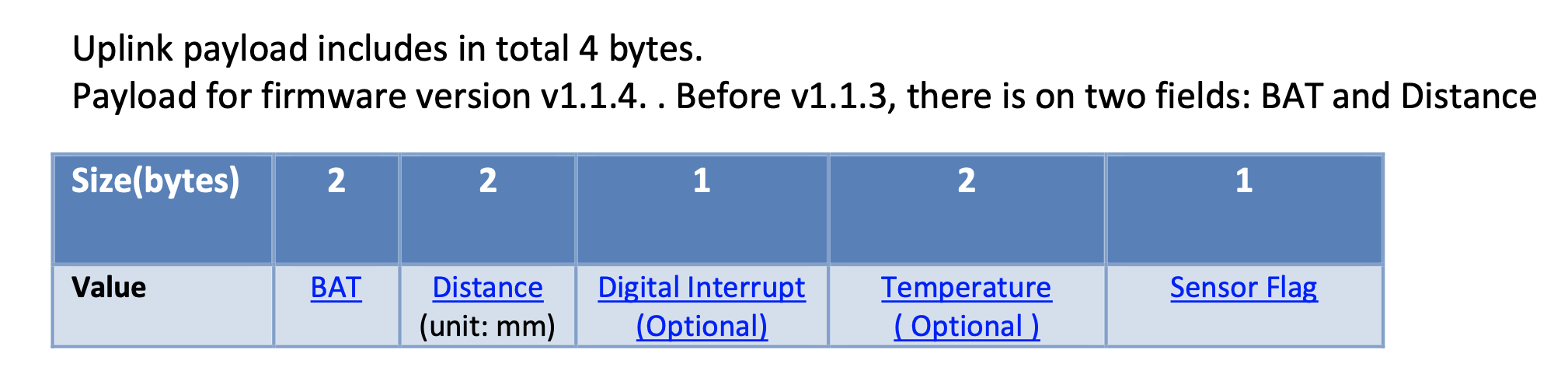
So I got 01F1 from measurement #1 and 0542 from measurement #2. Which a HEX > DEC online tool convertes to very acurate 497 and 1346 mm.
So it actually seems to be a problem with the decoder. I was using the one provided from Dragino for TTN: https://www.dragino.com/downloads/downloads/LoRa_End_Node/LDDS75/Payload/LDDS75%20decoder--TTN.txt
There is that if(len==5) condition, that otherwise returns the “No Sensor” value. But the length of the payload in my case is always 8 byte… so I just replaced the 5 with an 8 and it runs just fine 
function Decoder(bytes, port) {
  // Decode an uplink message from a buffer
  // (array) of bytes to an object of fields.
  var len=bytes.length;
  var value=(bytes[0]<<8 | bytes[1]) & 0x3FFF;
  var batV=value/1000;//Battery,units:V

  var distance = 0;
  if(len==8)
  {
   value=bytes[2]<<8 | bytes[3];
   distance=(value);//distance,units:mm
   if(value<20)
    distance = "Invalid Reading";
  }
  else
   distance = "No Sensor";

  var interrupt = bytes[len-1];
  return {
       battery:batV ,
       distance:distance,
       interrupt_status:interrupt
  };
}