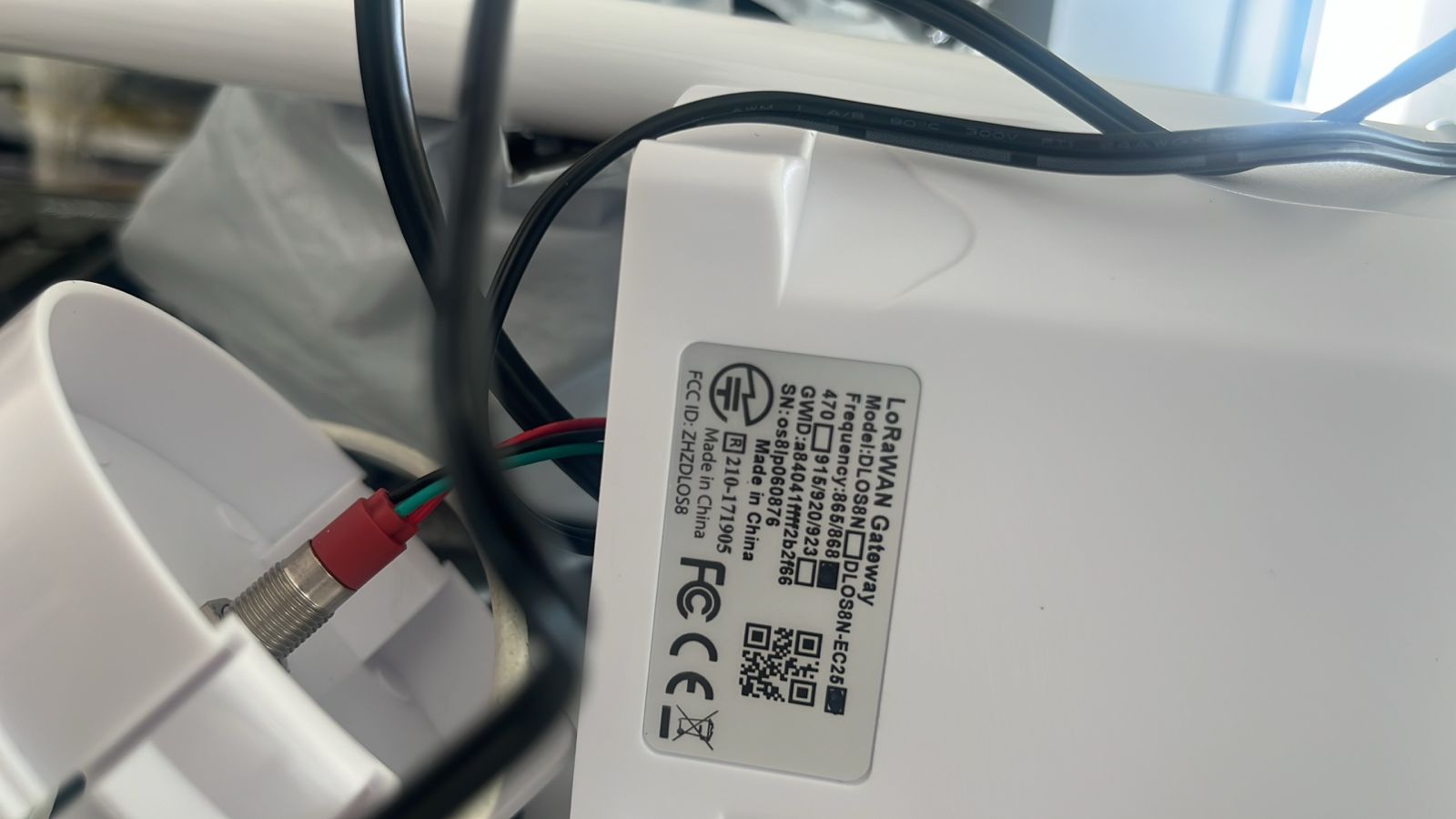
I am working with a Dragino LoRaWAN gateway (EU868 hardware) and The Things Network / The Things Stack Cloud.
Initial situation
Initially, I registered the gateway on TTN using normal (non-CUPS) configuration.
The gateway successfully connected to TTN, and I could see it online in the console.
However, end devices were not able to communicate properly through the gateway.
Issue Discovered During Debugging
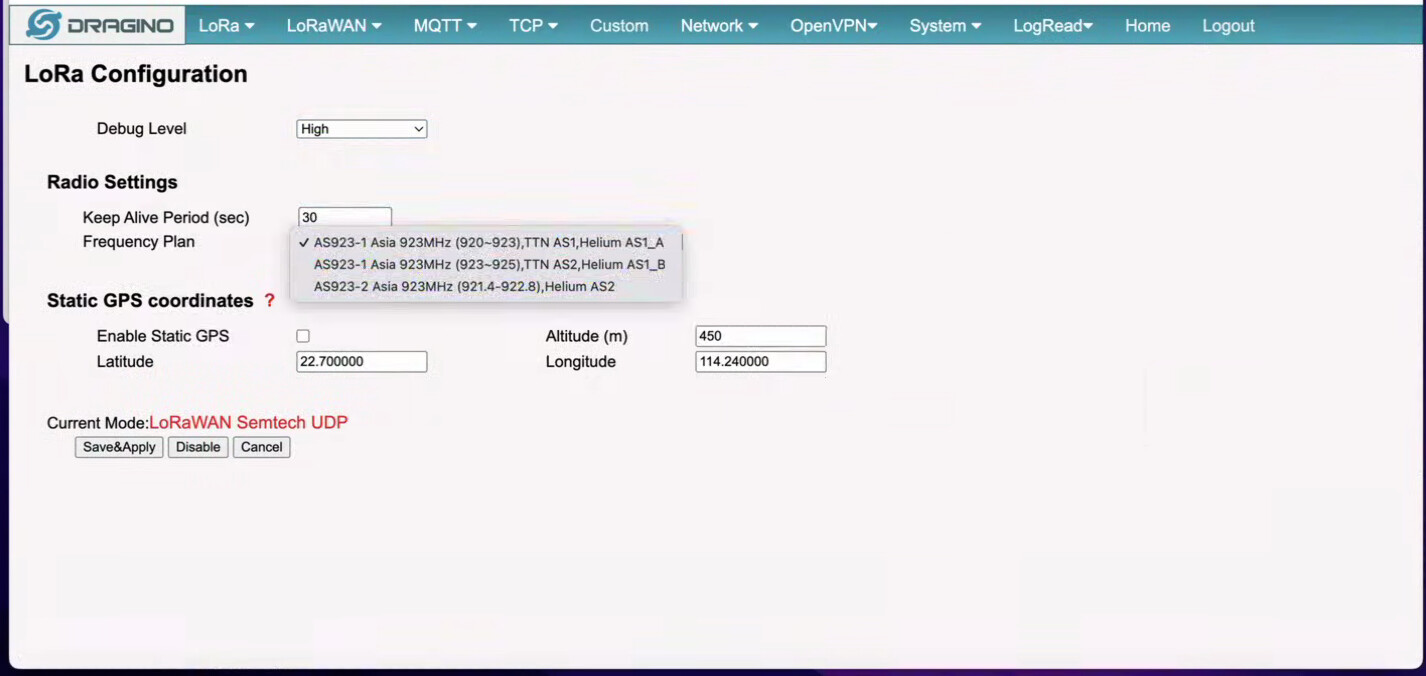
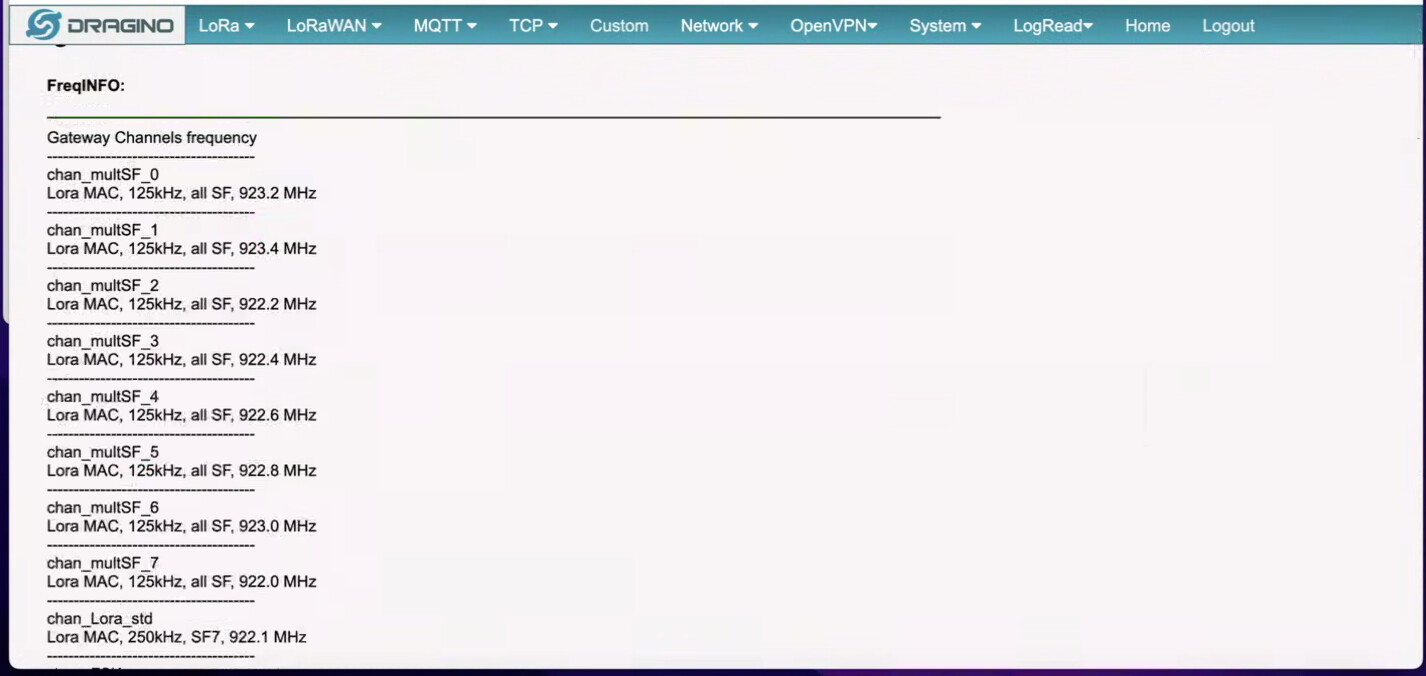
While troubleshooting, I checked the gateway logs (LogRead) and noticed that the gateway was operating on 923 MHz frequencies (AS923) instead of EU868.
Example observed frequencies:
**LogRead**
**FreqINFO:**
Gateway Channels frequency**

chan_multSF_0
Lora MAC, 125kHz, all SF, 923.2 MHz**

chan_multSF_1
Lora MAC, 125kHz, all SF, 923.4 MHz**

chan_multSF_2
Lora MAC, 125kHz, all SF, 922.2 MHz**

chan_multSF_3
Lora MAC, 125kHz, all SF, 922.4 MHz**

chan_multSF_4
Lora MAC, 125kHz, all SF, 922.6 MHz**

chan_multSF_5
Lora MAC, 125kHz, all SF, 922.8 MHz**

chan_multSF_6
Lora MAC, 125kHz, all SF, 923.0 MHz**

chan_multSF_7
Lora MAC, 125kHz, all SF, 922.0 MHz**

## **chan_Lora_std
Lora MAC, 250kHz, SF7, 922.1 MHz**

## **chan_FSK
FSK 50kbps, 921.8 MHz**

IoT Server Connection Ctate:
Logread FWD State:
Logread Error:
Logread RxTxJson:
Logread PULL State:

This suggests the gateway is not receiving EU868 from CUPS.
Because of this frequency mismatch, devices configured for EU868 could not communicate correctly.
Understanding After Research
After further research, I realized that:
- The cluster I am using automatically registers gateways as AS923
- This seems to be the default behavior based on cluster/region
- However, EU868 is allowed in my deployment region (UAE)
So the problem was not connectivity, but wrong frequency configuration.
Decision: Move to EU868 Using CUPS
Since the default registration kept using AS923, I looked for a way to force the gateway to operate on EU868.
Based on TTN documentation, the recommended approach is to use LoRa Basics Station with CUPS, where:
- Frequency plan is pushed from the server
- Gateway configuration becomes centrally managed
- Frequency can be changed by server-side configuration
Reference documentation:
Using CUPS to redirect to a different LNS | The Things Stack for LoRaWAN.
Actions Taken (In Sequence)
-
Registered the gateway on TTN / TTS Cloud
-
Set the gateway frequency plan to EU868 in the console
-
Switched the gateway to:
LoRa Basics Station – TTN -
Started configuring CUPS
-
Generated API keys from TTN:
-
LNS authentication key
- CUPS authorization key
- Added the keys to the gateway configuration
- Rebooted and retried multiple times
Current Problem
After enabling CUPS:
-
The gateway no longer completes connection to CUPS
-
Gateway logs show CUPS connection errors
-
Because CUPS is not connecting, the EU868 configuration is never applied
-
Gateway continues to show AS923 frequencies in LogRead
-
Devices still cannot communicate properly
Gateway Logs
- Relevant excerpts from
LogRead → LoRaWAN:
**
BootInfo:** Linux version 4.9.109 (root@DraginoHK) (gcc version 7.3.0 (OpenWrt GCC 7.3.0 r7360-e15565a) ) #0 Fri Jun 29 16:58:53 2018 MyLoader: sysp=aaaaaaaa, boardp=aaaaaaaa, parts=aaaaaaaa bootconsole [early0] enabled CPU0 revision is: 00019374 (MIPS 24Kc) SoC: Atheros AR9330 rev 1 Determined physical RAM map: memory: 04000000 @ 00000000 (usable) Initrd not found or empty - disabling initrd Primary instruction cache 64kB, VIPT, 4-way, linesize 32 bytes. Primary data cache 32kB, 4-way, VIPT, cache aliases, linesize 32 bytes Zone ranges: Normal [mem 0x0000000000000000-0x0000000003ffffff] Movable zone start for each node Early memory node ranges node 0: [mem 0x0000000000000000-0x0000000003ffffff] Initmem setup node 0 [mem 0x0000000000000000-0x0000000003ffffff] On node 0 totalpages: 16384 free_area_init_node: node 0, pgdat 8045dc44, node_mem_map 81000020 Normal zone: 128 pages used for memmap Normal zone: 0 pages reserved Normal zone: 16384 pages, LIFO batch:3 pcpu-alloc: s0 r0 d32768 u32768 alloc=1*32768 pcpu-alloc: [0] 0 Built 1 zonelists in Zone order, mobility grouping on. Total pages: 16256 Kernel command line: board=DRAGINO2 console=ttyATH0,115200 mtdparts=spi0.0:256k(u-boot)ro,16000k(firmware),64k(config),64k(art)ro rootfstype=squashfs noinitrd PID hash table entries: 256 (order: -2, 1024 bytes) Dentry cache hash table entries: 8192 (order: 3, 32768 bytes) Inode-cache hash table entries: 4096 (order: 2, 16384 bytes) Writing ErrCtl register=00000000 Readback ErrCtl register=00000000 Memory: 59900K/65536K available (3131K kernel code, 168K rwdata, 792K rodata, 316K init, 208K bss, 5636K reserved, 0K cma-reserved) SLUB: HWalign=32, Order=0-3, MinObjects=0, CPUs=1, Nodes=1 NR_IRQS:51 Clocks: CPU:400.000MHz, DDR:400.000MHz, AHB:200.000MHz, Ref:25.000MHz clocksource: MIPS: mask: 0xffffffff max_cycles: 0xffffffff, max_idle_ns: 9556302233 ns sched_clock: 32 bits at 200MHz, resolution 5ns, wraps every 10737418237ns Calibrating delay loop… 265.42 BogoMIPS (lpj=1327104) pid_max: default: 32768 minimum: 301 Mount-cache hash table entries: 1024 (order: 0, 4096 bytes) Mountpoint-cache hash table entries: 1024 (order: 0, 4096 bytes) clocksource: jiffies: mask: 0xffffffff max_cycles: 0xffffffff, max_idle_ns: 19112604462750000 ns futex hash table entries: 256 (order: -1, 3072 bytes) NET: Registered protocol family 16 MIPS: machine is Dragino Dragino v2 clocksource: Switched to clocksource MIPS NET: Registered protocol family 2 TCP established hash table entries: 1024 (order: 0, 4096 bytes) TCP bind hash table entries: 1024 (order: 0, 4096 bytes) TCP: Hash tables configured (established 1024 bind 1024) UDP hash table entries: 256 (order: 0, 4096 bytes) UDP-Lite hash table entries: 256 (order: 0, 4096 bytes) NET: Registered protocol family 1 PCI: CLS 0 bytes, default 32 Crashlog allocated RAM at address 0x3f00000 workingset: timestamp_bits=30 max_order=14 bucket_order=0 squashfs: version 4.0 (2009/01/31) Phillip Lougher jffs2: version 2.2 (NAND) (SUMMARY) (LZMA) (RTIME) (CMODE_PRIORITY) (c) 2001-2006 Red Hat, Inc. io scheduler noop registered io scheduler deadline registered (default) ar933x-uart: ttyATH0 at MMIO 0x18020000 (irq = 11, base_baud = 1562500) is a AR933X UART console [ttyATH0] enabled bootconsole [early0] disabled m25p80 spi0.0: found w25q128, expected m25p80 m25p80 spi0.0: w25q128 (16384 Kbytes) 4 cmdlinepart partitions found on MTD device spi0.0 Creating 4 MTD partitions on “spi0.0”: 0x000000000000-0x000000040000 : “u-boot” 0x000000040000-0x000000fe0000 : “firmware” 2 uimage-fw partitions found on MTD device firmware 0x000000040000-0x0000001a0000 : “kernel” 0x0000001a0000-0x000000fe0000 : “rootfs” mtd: device 3 (rootfs) set to be root filesystem 1 squashfs-split partitions found on MTD device rootfs 0x000000a70000-0x000000fe0000 : “rootfs_data” 0x000000fe0000-0x000000ff0000 : “config” 0x000000ff0000-0x000001000000 : “art” libphy: Fixed MDIO Bus: probed libphy: ag71xx_mdio: probed ag71xx-mdio.1: Found an AR7
- Relevant excerpts from
SystemLogs:
2025-12-10 12:24:39.607 [AIO:DEBU] [-1] HTTP connection shutdown… 2025-12-10 12:24:39.607 [CUP:ERRO] CUPS connect failed - URI: https://as1.cloud.thethings.network:443 2025-12-10 12:24:39.607 [CUP:INFO] Interaction with CUPS failed - retrying in 1m 2025-12-10 12:24:39.608 [TCE:INFO] Starting TC engine 2025-12-10 12:24:39.608 [TCE:ERRO] No TC URI configured 2025-12-10 12:24:39.608 [TCE:INFO] Router rejected or retry limit reached. Invoking CUPS. 2025-12-10 12:24:39.609 [TCE:INFO] Terminating TC engine 2025-12-10 12:24:39.609 [CUP:INFO] Starting a CUPS session in 60 seconds. 2025-12-10 12:24:39.609 [__:INFO] lgw_stop:1202: — IN Note: LoRa concentrator was not started… 2025-12-10 12:25:39.610 [CUP:INFO] Starting a CUPS session now. 2025-12-10 12:25:39.610 [CUP:INFO] Connecting to CUPS … https://as1.cloud.thethings.network:443 (try #2) 2025-12-10 12:25:39.613 [AIO:INFO] /etc/station/cups.trust: cert. version : 3 serial number : 82:10:CF:B0:D2:40:E3:59:44:63:E0:BB:63:82:8B:00 issuer name : C=US, O=Internet Security Research Group, CN=ISRG Root X1 subject name : C=US, O=Internet Security Research Group, CN=ISRG Root X1 issued on : 2015-06-04 11:04:38 expires on : 2035-06-04 11:04:38 signed using : RSA with SHA-256 RSA key size : 4096 bits basic constraints : CA=true key usage : Key Cert �2025-12-10 12:25:39.616 [AIO:ERRO] [-1] HTTP connect failed: NET - Failed to get an IP address for the given hostname 2025-12-10 12:25:39.616 [AIO:DEBU] [-1] HTTP connection shutdown… 2025-12-10 12:25:39.616 [CUP:ERRO] CUPS connect failed - URI: https://as1.cloud.thethings.network:443 2025-12-10 12:25:39.616 [CUP:INFO] Interaction with CUPS failed - retrying in 1m 2025-12-10 12:25:39.616 [TCE:INFO] Starting TC engine 2025-12-10 12:25:39.617 [TCE:ERRO] No TC URI configured 2025-12-10 12:25:39.617 [TCE:INFO] Router rejected or retry limit reached. Invoking CUPS. 2025-12-10 12:25:39.617 [TCE:INFO] Terminating TC engine 2025-12-10 12:25:39.618 [CUP:INFO] Starting a CUPS session in 60 seconds. 2025-12-10 12:25:39.618 [__:INFO] lgw_stop:1202: — IN Note: LoRa concentrator was not started…
Any guidance from users running Dragino gateways with LoRa Basics Station on TTS Cloud would be greatly appreciated, especially regarding correct CUPS endpoints and expected behavior when CUPS connectivity fails.
Thanks in advance.