Introducing fieldtester.io: from live RAK tester readings to coverage maps and site planning

Hi everyone,

I recently bought a RAK10701-Plus, expecting to connect it to TTN and start checking coverage, just as I had with the older RAK10701-P.

That turned out to be less straightforward than expected. The Plus uses a different protocol, so the backend I had used with its predecessor did not return all the readings to its display.

I built a solution for my own tester, then decided to make it available to others: fieldtester.io.

What does it do?

fieldtester.io receives your tester’s uplinks through a TTN webhook, processes the reception metadata and sends the results back to the device. This brings uplink signal readings, gateway distances where location information is available, and packet-loss information to your tester’s display.

fieldtester.io currently supports five field tester models: RAK10701-Plus, RAK10701-P, RAK10701-L, RAK10706 and Adeunis FTD.

You don’t need a RAK gateway or your own backend server. You do need working TTN coverage and a downlink path to your tester.

Free: get the readings on your tester

If you simply want to check reception in the field, the Free plan gets the readings onto your device without storing measurement locations.

Create an account, configure the webhook in your TTN application and start measuring. A step-by-step guide walks you through the setup.

Pro: record and document your surveys

Pro includes the Free features and adds tools for keeping and analysing your measurements:

  • Up to three testers.

  • Every measurement point is recorded and grouped into measurement sessions.

  • Each session has its own map, colour-coded by signal strength.

  • Export as CSV, JSON or Excel, including coordinates and all receiving gateways.

  • Measurements are retained for 365 days.

This is useful for comparing locations, documenting coverage gaps or checking what changed after installing an additional gateway.

Business: plan deployments and work as a team

Business includes the Pro features and expands the service for teams and customer projects:

  • Up to 25 testers.

  • Site planning: place pins on the map to assess whether coverage is likely to meet an application’s needs, using your measurements, line-of-sight analysis and active TTN gateways.

  • A line-of-sight profile for each gateway, showing terrain, buildings and the Fresnel zone alongside measured values.

  • A combined coverage map across all measurement sessions.

  • Team access with roles.

  • Device management: assign testers and maintain device details and status.

  • Read-only sharing links for individual sessions or the combined coverage map.

  • PDF reports with your logo for your customers.

  • Measurement sessions remain available for as long as your Business subscription is active.

The planning tools help you assess potential locations and decide where to measure next. An on-site test remains the way to check actual reception.

Why I built it

A gateway marker on a map doesn’t tell you whether a sensor will work behind a building, near the ground or on the other side of a hill.

I wanted a straightforward way to check those locations, keep the results and understand which gateways actually received each measurement. fieldtester.io has grown from getting the missing readings onto my own tester into a tool for documenting and planning TTN deployments.

The Free plan remains useful on its own. The paid plans add recording, storage, analysis and collaboration tools for those who need them.

Try it and share your feedback

If you have a compatible RAK tester, I’d be happy for you to give it a try:

https://fieldtester.io

I’d particularly appreciate feedback from people measuring in different environments. What works well, what is missing, and what would make it more useful for your coverage surveys?

Best regards,
André
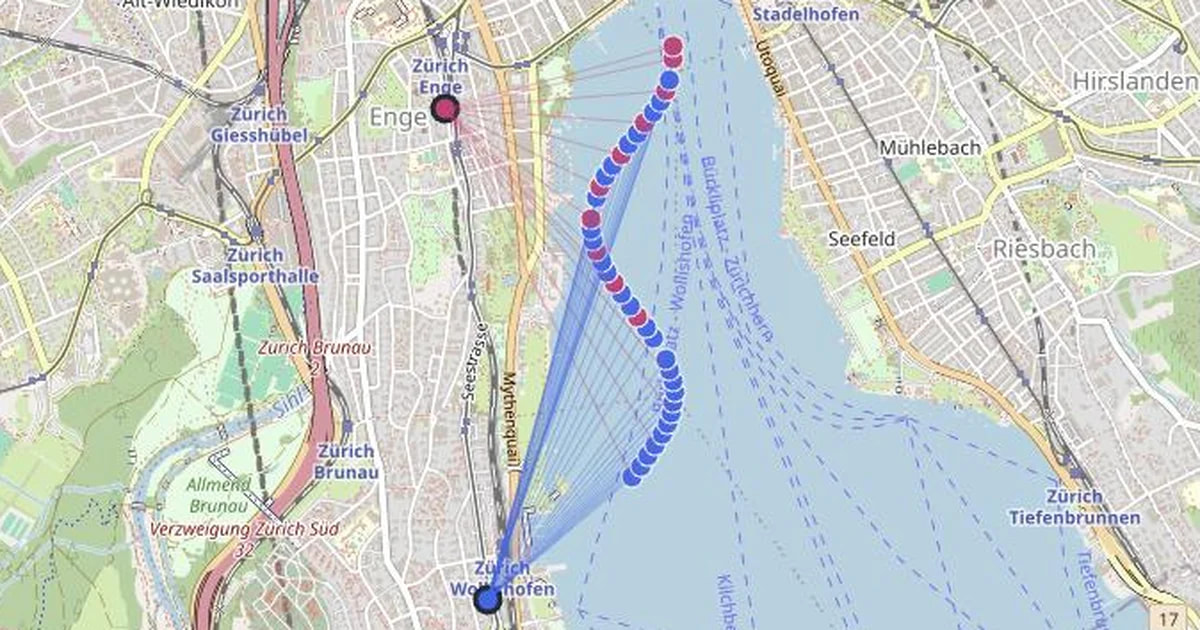
Looks fairly comprehensive!

How do you deal with the Fair Use Policy of only 10 downlinks a day?

Thanks Nick, and fair question.

The short answer: on the community network a survey session goes beyond 10 downlinks a day. The RAK10701-Plus is built that way. It sends an uplink and waits for an answer with the network-side values, so every reading needs a downlink. RAK’s own reference server does the same, and so did the earlier backends for these testers. I’d rather be upfront about that than pretend otherwise.

How we handle it:

  • Short sessions, not permanent operation. A field tester is for a walk or a drive to check coverage, then it gets switched off. We are adding this to the setup guide: use an interval of 30 s or more, and turn the tester off when the survey is done.
  • Uplink airtime stays within limits. At SF7 a packet from the tester is about 60 ms on air, so a typical session stays under 30 s a day. The interval and data rate are set on the tester, not by us.
  • Not only TTN. The service works with any The Things Stack deployment. For integrators who survey regularly, the better place is their own network or The Things Stack Cloud, where the Fair Use Policy doesn’t apply.
  • Why we don’t drop downlinks on our side. The tester counts every missing answer as downlink loss, so throttling on the server would make the display show wrong figures.

The FUP thread mentions exceptions for R&D, and TTN Mapper was given room for coverage mapping. Would field testing on the community network fall under that? If the community prefers a hard cap per device and day, I’m open to building one. Suggestions are welcome.

Which FUP thread? The FUP policy in the docs is quite clear, people discussing bending the rules to their own situation rather flies in the face of the whole ‘shared community resource’ idea. TTN is for R&D, are you hoping there is a sub-category of R&D R&D?

Other points:

Many users are responsible, a few don’t give a fig about anyone and will just use & abuse a system as they see fit. Some drive round with multiple trackers in their car 24/7/365 …

TTN Mapper had no need to downlinks - it read the equivalent downlink data via the mobile app but was not reliant on that at all. Adding a GSM module in to your device would solve that or develop an app of your own.

Given that most gateways antennas & positioning is usually much better than the device, the downlink path is a bit academic - if the gateway heard the device, it is reasonably safe to assume that a downlink will arrive. If you really have to know, buy an instance or run your own servers.

We literally don’t care about other LW server implementations and in the context of TTN/TTI, we do care about the free servers we get. If you facilitate a denial of service on someone’s personal community gateway, causing issues for other community devices, you won’t be very popular.

TTI got bored of asking nicely & no longer have the time, throttling is pretty much binary these days, behave, OK, spike the graphs, bye bye account. Then you have to deal with the support fallout from your user.

This is the pointy end of the range of opinions, but it reflects the efforts put in by various community members since v3 roll out to keep TTN up & free in the face of some pretty egregious abuse by a substantial minority.

Thanks Nick, I appreciate the background, and I understand the community has had to clean up after a lot of careless use since v3.

A few points from our side, for context:

  • According to RAK’s published firmware (RAK10701-P/-L v1.1.2), every uplink is a confirmed uplink with an ACK downlink, not a LinkCheck. So the network already sends a downlink for each uplink, with or without us. Our service answers on that same exchange, so the device shows what it was built to show – gateway count, distance, RSSI/SNR range – instead of leaving these fields blank.
  • Most devices we support need no downlink at all: Dragino LGT-92, SenseCAP T1000/T2000, Adeunis FTD and other GPS trackers. For those it’s plain coverage mapping. Since TTN Mapper announced that the service might be discontinued, there have been very few new measurements in our region. Coverage data was already thin here after the v2→v3 move.
  • I run two community gateways myself, with no application of my own behind them. I’m not trying to take more than I give.
  • TTN is the first network we connected, not the only one. TTI instances already work, and we’re adding Helium and Swisscom LPN soon. Operators of private networks are very welcome to connect their network to our service – just get in contact with us.

We leave it to our users to decide how they use their devices on TTN. Our guide and FAQ state the fair use policy plainly: a field tester goes beyond 10 downlinks a day within minutes, TTN can throttle or block accounts that break the policy repeatedly, and getting an account unblocked is between the user and TTN. Anyone who surveys regularly can use a TTI instance, their own stack or, soon, other networks.

Thanks for the clear answer – I asked, and I’ve got my reply. Our guide and FAQ now say exactly that, so users know where they stand.

From here I’d like to keep this thread about the service itself: what it does, which devices it supports and how to set it up. If anyone wants to discuss the fair use side further, a separate thread is probably the better place.

Which is an issue for most/all LoRaWAN networks. ACK equals downlink and downlinks don’t scale on LoRaWAN networks. We’ve had to ask several vendors to correct their firmware over the years and it’s surprising a well established LoRaWAN vendor makes this kind of mistake in 2026.

This is NOT a justification - someone else breaking the FUP doesn’t make it right or OK for you to encourage it by proxy / product delivery even if it is in a different guise.

It would be much better for the community if the people don’t act as the delivery agent of poor practise. It’s like being a health nut that deals drugs. It would be much more appropriate that the end user HAS to turn on the feature with a clear warning, rather than having it on by default. This is a better position for you to be in - one of your users may end up with issues with the local authorities or their LNS provider because the default was harmful to a network - and who do you think they will come to to get answers?

As your product has what can only be considered to be a flaw in its design, starting a separate thread on it is obfuscation. I’d reiterate, other networks aren’t relevant - you can ship configs however you like, but if your product by default is going to spam the TTN / Sandbox, this is going to be an ongoing concern.

@kersing I fully agree: ACK equals downlink, and a field tester that confirms every reading is a firmware choice that doesn’t scale. Feel free to discuss this with RAK directly.

@descartes Don’t shoot the messenger. The RAK10701 sends a confirmed uplink with every reading, whether fieldtester.io is connected or not, and the network answers each one with a downlink. Our reply doesn’t add one: the network server puts it into that same ACK downlink. The only difference our reply makes is 11 bytes more payload in a downlink that goes out anyway.

So an opt-in wouldn’t save a single downlink on TTN. Switching fieldtester.io off only leaves half the display empty, while the tester keeps sending exactly the same traffic. The guide and the FAQ explain the Fair Use Policy and the risk of a blocked account. Users who go beyond it do so with or without us.

To make this airtight, fieldtester.io will answer confirmed uplinks only. Our service can then never cause a downlink that wouldn’t happen without it.

The real fix belongs in the firmware: each reading carries its own packet number, so the tester could ask for confirmation only on every 5th or 10th reading and send the rest unconfirmed. That would cut the downlinks to a fifth or a tenth, and fieldtester.io would work with it as it is.

Huh? You didn’t develop anything LoRa related then? Just the website?

And you have absolutely no control over this device - you can’t turn off the confirmed uplink at all?

Spoiler: You can - the code is on GitHub …

@descartes No, not yet. So far Dragino has had every sensor I needed for my and my customers applications. Maybe a smart birdhouse will come along one day :wink:, who knows.

Yes, where the firmware is open, anyone who wants to rebuild and flash it can switch confirmed uplinks off. But we don’t patronise our users: almost all of them run the firmware RAK ships, and asking them to modify it would be overstepping. fieldtester.io also runs on other LoRaWAN networks, such as The Things Industries and private ChirpStack servers, where this limit doesn’t apply.

Either way, fieldtester.io follows the device: it answers confirmed uplinks only and never adds a downlink. So the service side is covered for everyone who wants to use it. How the tester behaves is a question for RAK and for whoever builds their own firmware.